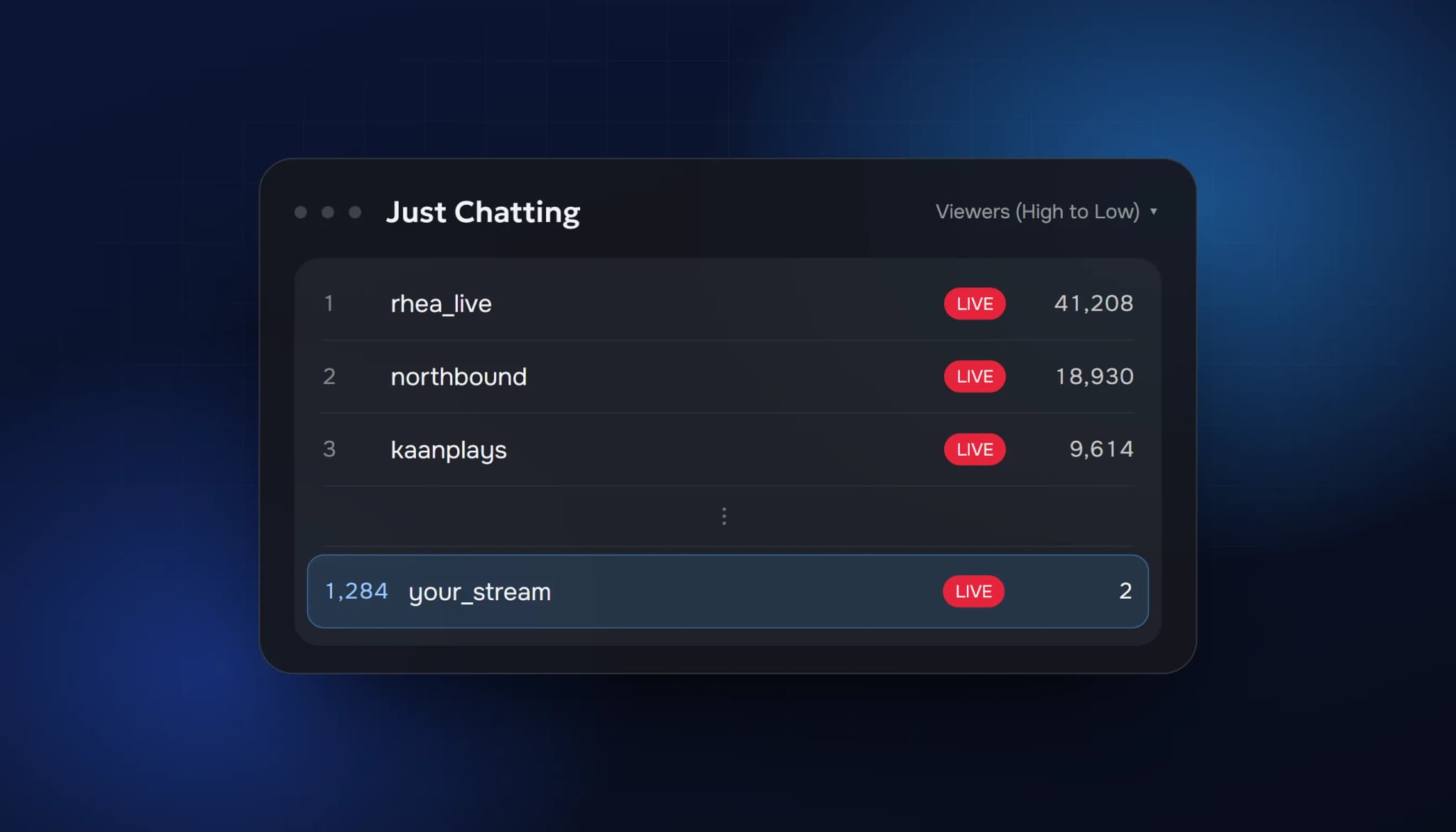
Short answer: Twitch doesn't have one ranking. A category page shows streams in the order the viewer picks, "Recommended For You" by default, with "Viewers (High to Low)" one click away. Recommendations are personalised to what that person has watched. Concurrent viewer count affects both, which is why a stream at 0–3 viewers is so hard to find.
Twitch doesn't publish its recommendation formula, so this guide sticks to what you can see on the site, and it flags where the rest is educated guesswork.
Where people find live streams on Twitch
A viewer can reach your stream from a handful of places:
- Category pages, for example Just Chatting or a specific game
- The home page and its recommended rows
- The Following list, for channels they already follow
- Search, when they look for your name or a game
- Raids, clips and links shared outside Twitch
Only the first two bring you new viewers who have never heard of you. Both depend on how Twitch orders streams.
How category pages are ordered
Open any category and you'll see a sort menu. The options are:
- Recommended For You, the default, which is personalised
- Viewers (High to Low)
- Viewers (Low to High)
- Recently Started
In "Viewers (High to Low)" the order is simple: the stream with the most concurrent viewers comes first. In a big category with thousands of live channels, a stream with 2 viewers can be hundreds of rows down. Nobody scrolls that far.
"Recommended For You" isn't a pure viewer count. It's built around what the viewer already watches, and in practice the streams it shows are mostly ones that already have an audience. Small streams rarely appear in it.
"Recently Started" and "Viewers (Low to High)" are the only sorts that favour small streams, and few viewers use them.
What seems to matter
Twitch hasn't published a list of ranking factors. These are the signals you can see in how the site behaves:
| Signal | Why it matters |
|---|---|
| Concurrent viewers | Directly decides position in "Viewers (High to Low)", and popular streams dominate recommendations |
| The viewer's own history | Recommendations favour categories and channels a person already watches |
| Category and tags | Decide which pages and filtered views you appear in at all |
| Language | Viewers can filter by language, and see streams in their language first |
| Consistency | Regular schedules build a returning audience, which raises your concurrent viewers |
Anything more specific than this, such as exact weights for chat activity or watch time, is guesswork. Be careful with guides that state them as facts.
Why 0 to 3 viewers is invisible
Put the two sorts together and you get the problem every new streamer runs into:
- In "Viewers (High to Low)" you're near the bottom.
- In "Recommended For You" you rarely appear, because few people are watching yet.
- So nobody new finds you, and your viewer count stays where it is.
This is why the first few viewers are the hardest to get, and why reaching 3 average viewers for Twitch Affiliate takes most people much longer than the other requirements.
What you can change
You can't change Twitch's sort, but you can change where you appear in it.
Choose the category by its size
Look at how many channels are live in a category at the time you stream. In a category with 40 live channels, 5 viewers can put you on the first screen. In one with 3,000, the same 5 viewers put you on page twenty. Smaller, active categories are the easiest place to be seen.
Stream when your category is less crowded
The same category has very different competition at 8 pm and at 11 am. Check the number of live channels at different times and pick slots where you rank higher.
Use accurate tags and titles
Tags and language decide which filtered views you appear in. A precise title also helps when someone searches.
Build the returning audience
People who follow you and come back each week raise your average without depending on the directory at all. A fixed schedule is the simplest way to get there.
Bring viewers in from outside
A Discord, short clips on other platforms, or a community you're part of can bring your first viewers. Each one moves you up the list for everyone else.
Where viewer bots fit in
Because category order follows concurrent viewers, some streamers add viewers with a viewer bot to move higher in "Viewers (High to Low)". It's worth being direct about it:
- It changes where you appear. It doesn't make the content better or make anyone stay.
- Twitch's Community Guidelines prohibit artificially inflated viewership, so there is always a risk, whatever a provider promises.
- If you use one, a number that fits your category looks normal. A jump from 2 to 400 doesn't.
If you want to see what that looks like, our buy Twitch viewers page lists the plans and explains what extra viewers can and can't do.
And on Kick?
Kick's category pages are sorted by viewer count, highest first, which you can see in the page address when you open a category. That ties viewer count even more directly to visibility on Kick than on Twitch. Our Kick view bot page covers this in more detail.
FAQ
Does chat activity affect ranking on Twitch?
Twitch hasn't said so. An active chat keeps viewers watching longer and brings them back, which raises your concurrent viewers, so it matters either way.
Does streaming longer help me rank?
Being live longer gives more chances to be found, but a long stream that loses its viewers averages lower. Consistency matters more than length.
Do followers affect where I appear in a category?
Not directly in the viewer sort. Followers see you in their Following list and get go-live notifications, which raises your concurrent viewers.
Is there a way to appear on the Twitch home page?
The home page is personalised for each viewer. There's no application for it; it follows the same signals as recommendations.
- how twitch ranks streams
- twitch algorithm
- twitch category ranking
- twitch discoverability
- how to get discovered on twitch
ViewerBoss Team
Guides on growing a stream on Twitch and Kick